

Repair History
Chronological log of all maintenance activities performed on mining equipment.
The Repair History sub-page provides a chronological log of all maintenance activities performed on mining equipment. Accessible from the Inventory sidebar, this view enables operators to track part replacements, diagnose recurring issues, and audit technician activities.
For documenting repairs with notes, see Comments. For spare parts tracking, see Spare Parts Inventory.
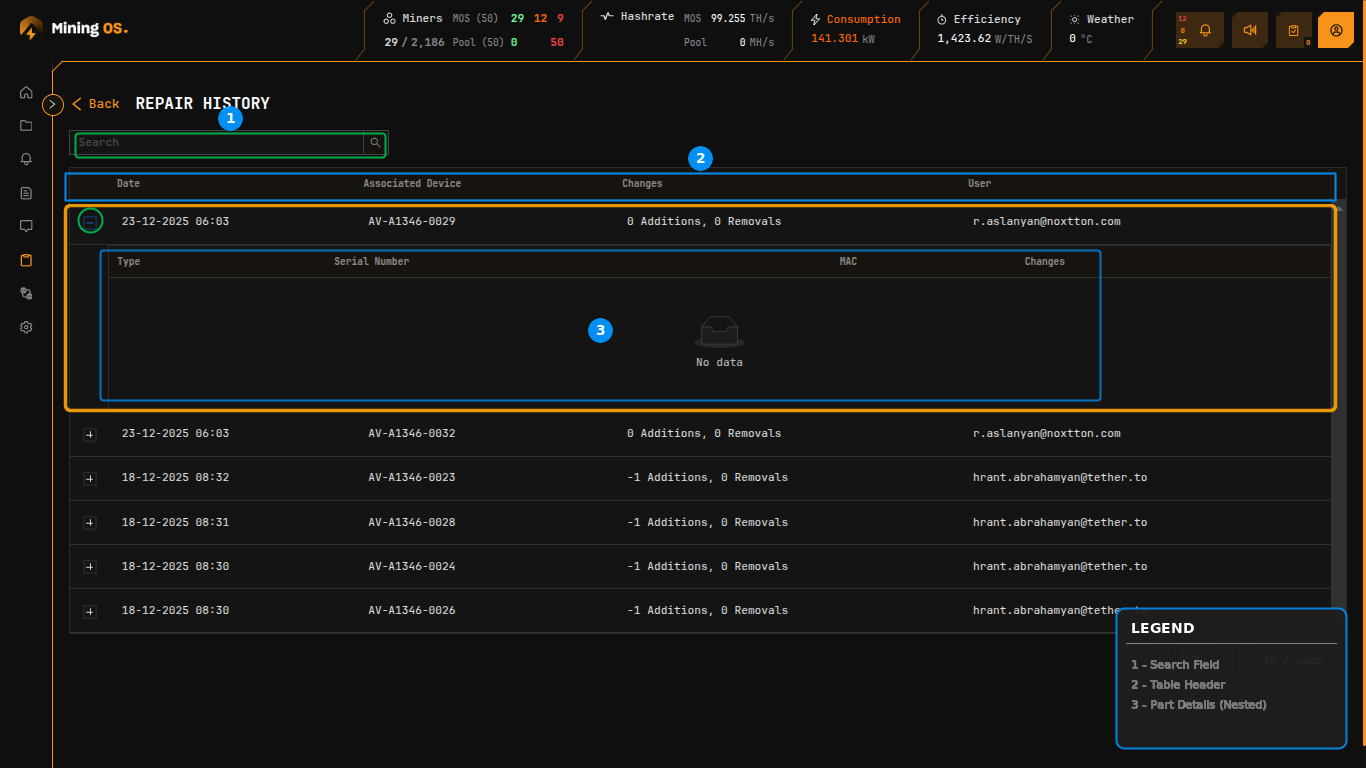 Figure 18: Repair History showing expandable repair records with part change details
Page Controls
| Control | Function |
|---|---|
| Search | Filter records by device code, date, or technician email |
| Back | Return to Inventory Dashboard |
Search Examples
| Search Term | Result |
|---|---|
AM-S19XP-0037 | Shows repairs for specific miner |
2024-01 | Shows repairs from January 2024 |
tech@example.com | Shows repairs by specific technician |
CB- | Shows repairs involving control boards |
Repair Records Table
The main table displays repair events in reverse chronological order.
| Column | Description | Related Documentation |
|---|---|---|
| Date | Timestamp when repair was logged | — |
| Associated Device | Miner code that received the repair | Miner Short Codes |
| Changes | Summary of part additions and removals | Change Summary Format |
| User | Email address of technician who performed the repair | User Management |
Each row can be expanded using the "+" icon to reveal detailed part change information.
Expanded Part Details
Expanding a repair record displays a nested table showing individual component changes.
| Column | Description | Related Documentation |
|---|---|---|
| Type | Component category (Controller, PSU, Hashboard) | Spare Parts Inventory |
| Serial Number | Part serial number or QA inventory reference | — |
| MAC | Network MAC address (for control boards) | — |
| Changes | Direction indicator (Added or Removed) | — |
When no parts were physically changed during a repair (e.g., software-only fixes or status updates), the expanded section displays "No data".
Change Summary Format
The Changes column uses a compact notation indicating parts added and removed during the repair.
| Format | Meaning | Example Scenario |
|---|---|---|
| 0 Additions, 0 Removals | No physical part changes | Software update, status change |
| -1 Additions, 0 Removals | One part removed, none added | Part removed for testing |
| 1 Additions, 1 Removals | One part swapped (removed and replaced) | Faulty part replacement |
| 2 Additions, 0 Removals | Two parts added | Installing new components |
| 0 Additions, 2 Removals | Two parts removed | Stripping for parts |
Negative addition values indicate parts were removed from the miner. This tracking enables accurate inventory reconciliation between Miners Inventory and Spare Parts Inventory.
Understanding the Math
When a part swap occurs:
- 1 Addition: New part installed from spare inventory
- 1 Removal: Old part returned to spare inventory (status: Faulty or Recovered)
This bidirectional tracking ensures:
- Spare parts inventory stays accurate
- Part history is fully auditable
- Cost accounting reflects actual part consumption
Workflow Integration
Repair records are created through these workflows:
| Source | Action | Documentation |
|---|---|---|
| Miners Inventory | Select miner → Actions → Repair | Miners Inventory — Actions |
| Explorer | Miner → Maintenance | O&M — Maintenance Lab |
| Comments | Field technician repair notes | Comments |
Related Documentation
- Miners Inventory — Individual miner management and repair initiation
- Spare Parts Inventory — Track controllers, PSUs, and hashboards
- Historical Device Movements — Location and status change audit trail
- Current Site Overview — Component status panels
- O&M: Adding & Updating Miners — Maintenance workflows
- Comments — Add repair notes and observations