

Miner Distribution
Matrix view of mining capacity allocation across your facility for deployment planning and utilization tracking.
The Miner Distribution section provides a matrix view of how mining capacity is allocated across your facility. This view helps operators identify deployment gaps, track utilization rates, and plan capacity expansions.
Expanding the Miner Distribution accordion reveals a detailed allocation table showing how mining capacity is distributed across the facility.
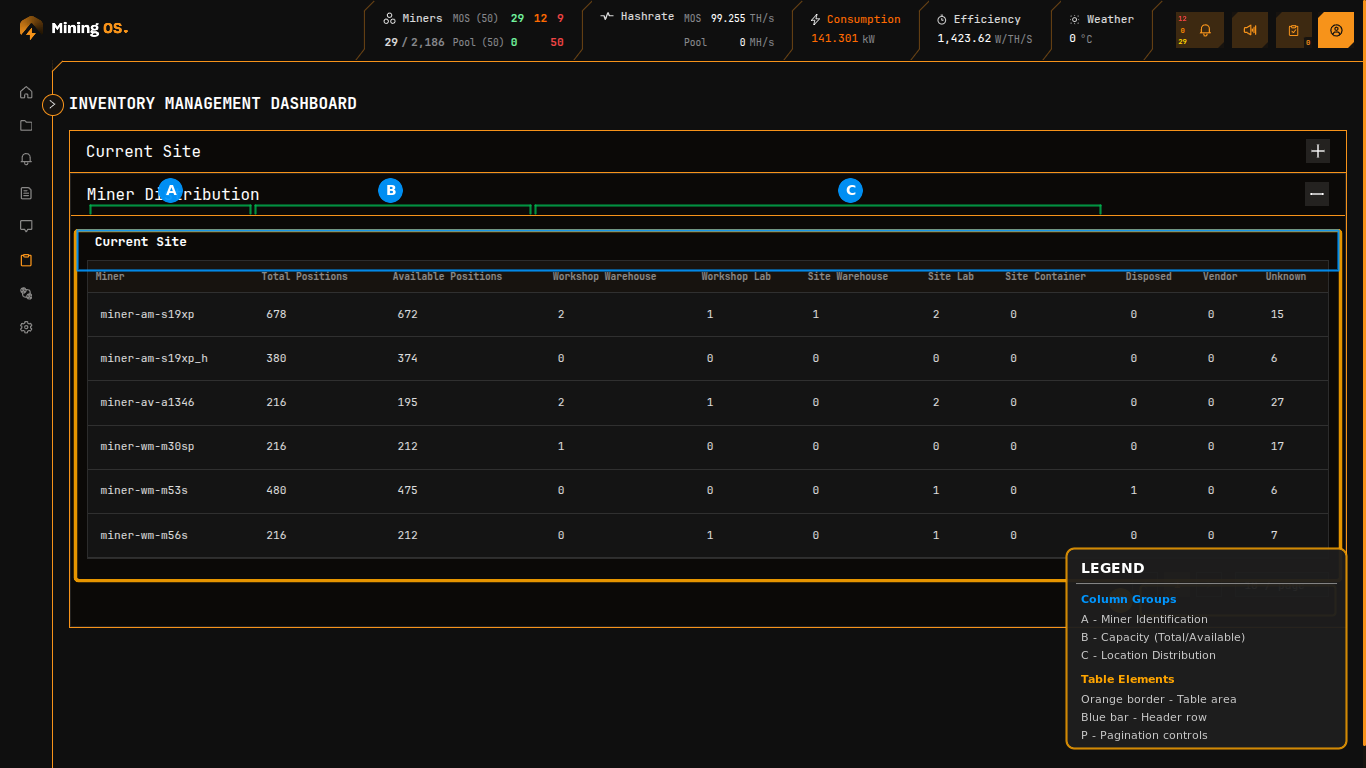 Figure 6: Miner Distribution table showing position allocation by model and location
Quick Navigation
| Section | Description |
|---|---|
| Table Structure | Column definitions |
| Capacity Planning | Utilization analysis |
| Model Identification | Miner code conventions |
| Pagination | Large inventory navigation |
Table Structure
The distribution table organizes data with miner models as rows and location categories as columns. This matrix view enables rapid identification of capacity utilization and deployment gaps.
| Column | Description | Related Documentation |
|---|---|---|
| Miner | Model identifier following the naming convention | Supported Devices |
| Total Positions | Maximum deployment slots allocated for this model | Container capacity |
| Available Positions | Unoccupied slots ready for deployment | — |
| Workshop Warehouse | Units stored at repair facility | Current Site Overview |
| Workshop Lab | Units under active repair or testing | Repair History |
| Site Warehouse | Units stored on-site awaiting deployment | — |
| Site Lab | Units in on-site testing | — |
| Site Container | Units actively deployed in production | Explorer |
| Disposed | Units removed from service | — |
| Vendor | Units at external service provider | — |
| Unknown | Units with unconfirmed location status | Operational Best Practices |
For detailed management of individual miners within these locations, see the Miners Inventory page.
Capacity Planning
The relationship between Total Positions and Available Positions indicates deployment headroom:
| Scenario | Indication | Action |
|---|---|---|
| Low available positions | Near full capacity | Plan expansion or reallocation |
| High available positions | Underutilization | Investigate deployment bottlenecks |
| Many in Workshop Lab | Repair backlog | Increase repair capacity |
| Many Unknown | Tracking issues | Physical audit required |
For guidance on addressing capacity issues, see Operational Best Practices.
Model Identification
Miner model identifiers encode manufacturer and model information. This naming convention is consistent across MiningOS.
| Prefix | Manufacturer | Example Models | Official Support |
|---|---|---|---|
am- | Bitmain Antminer | S19XP, S21, S21 Pro | Bitmain Support |
av- | Canaan Avalon | A1346 | Canaan Shop |
wm- | MicroBT Whatsminer | M30SP, M53S, M56S, M63 | WhatsMiner Shop |
The suffix indicates the specific model variant (e.g., s19xp, a1346, m30sp). For the complete list of supported models, see Supported Devices.
Pagination
Large inventories utilize pagination controls at the bottom right of the table:
| Control | Function |
|---|---|
| Page numbers | Direct navigation to specific page |
| Items per page | Adjust rows displayed (default: 10) |
| Total pages | Shows current position in full dataset |
Cross-Reference with Other Views
| Need | Use This View | Documentation |
|---|---|---|
| Individual miner details | Miners Inventory | Miners Inventory |
| Status breakdown | Current Site Overview | Current Site Overview |
| Movement audit | Historical Movements | Historical Device Movements |
| Operational device search | Explorer | Explorer |
| Temperature analysis | Heatmaps | Heatmaps |
Related Documentation
Inventory Module
- Current Site Overview — Status breakdown by component category
- Miners Inventory — Individual miner management
- Historical Device Movements — Location audit trail
Operator Manual
- Explorer — Search and filter devices across the fleet
- O&M: Adding & Updating Miners — Registration and maintenance procedures
- Container Example: Bitdeer — Bitdeer container capacity
- Container Example: Antspace — Antspace container capacity
- Operational Best Practices — Recommended operating procedures
Architecture & Reference
- Architecture — System design and worker hierarchy
- Supported Devices — Complete hardware compatibility list
- Installation — Worker setup procedures