

Current Site Overview
Real-time inventory snapshot displaying equipment status across five component categories.
The Current Site Overview provides a real-time inventory snapshot for your mining facility, displaying equipment status across five component categories. This view enables rapid assessment of fleet health and identifies units requiring attention.
Expanding the Current Site accordion on the Inventory Dashboard reveals the inventory panels described below.
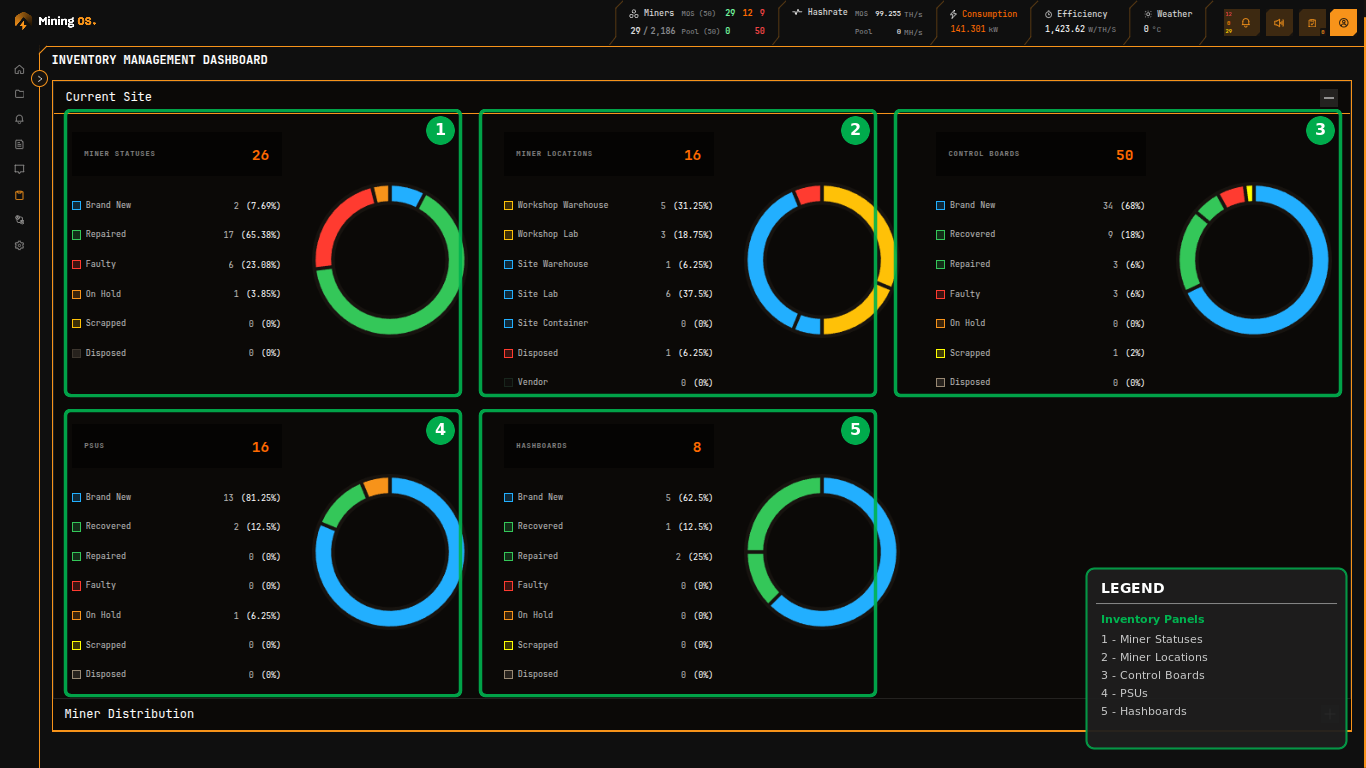 Figure 5: Current Site section showing inventory status across five component categories
Quick Navigation
| Section | Description |
|---|---|
| Panel Layout | Overview of inventory categories |
| Miner Statuses Panel | Lifecycle state tracking |
| Miner Locations Panel | Physical distribution |
| Control Boards Panel | Control board inventory |
| PSUs Panel | Power supply tracking |
Panel Layout
The Current Site view arranges inventory categories in a responsive grid:
- Top row: Complete mining units and primary components (miners, control boards, PSUs)
- Bottom row: Hashing subsystems (hashboards)
Each panel displays a donut chart visualization alongside a detailed breakdown by status or location.
Miner Statuses Panel
This panel tracks the lifecycle state of complete mining units within the site inventory. The total count appears prominently beside the panel header, with each status showing both absolute count and percentage of total.
| Status | Description | Typical Next State |
|---|---|---|
| Brand New | Factory-sealed units not yet deployed | Repaired (after testing) |
| Repaired | Units returned to service after maintenance | Brand New or Faulty |
| Faulty | Units identified as non-functional awaiting diagnosis | Repaired or Scrapped |
| On Hold | Units temporarily removed from rotation | Repaired or Faulty |
| Scrapped | Units deemed beyond economical repair | Disposed |
| Disposed | Units permanently removed from inventory | — |
The color-coded donut chart provides at-a-glance assessment of fleet health. A predominance of green (Repaired) and blue (Brand New) indicates healthy inventory, while significant orange (Faulty) or yellow (On Hold) segments warrant investigation.
For detailed miner management, see Miners Inventory. To add or update miners, refer to O&M: Adding & Updating Miners.
Miner Locations Panel
This panel shows physical distribution of mining units across facility areas. Location tracking enables efficient logistics planning and maintenance scheduling.
| Location | Purpose | Typical Equipment State |
|---|---|---|
| Workshop Warehouse | Storage area within repair facility | Brand New, Repaired |
| Workshop Lab | Active repair and testing benches | Faulty, On Hold |
| Site Warehouse | On-site storage for deployment-ready units | Brand New, Repaired |
| Site Lab | On-site testing and burn-in area | Repaired, On Hold |
| Site Container | Deployed in production containers | Active mining |
| Disposed | Removed from active tracking | Scrapped |
| Vendor | Sent to external repair or RMA | Faulty |
For location-based device search, see Explorer. For equipment movement history, see Historical Device Movements.
For miner position management within containers, see O&M: Adding & Updating Miners.
Control Boards Panel
Tracks inventory of control boards—the computational brain of each mining unit responsible for coordination and network communication. Control boards are frequently swapped during troubleshooting, making accurate tracking essential for cost management.
Control board specifications vary by manufacturer:
| Manufacturer | Control Board Types | Documentation |
|---|---|---|
| Bitmain | CB4, CB5 series | Bitmain Support |
| MicroBT | Various per model | MicroBT Official |
| Canaan | Model-specific | Canaan Support |
For complete hardware specifications, see Supported Devices.
For spare parts management, see Spare Parts Inventory.
PSUs Panel
Monitors power supply unit inventory. PSUs convert facility power to the voltages required by mining hardware and represent a common failure point. The status breakdown mirrors the miner statuses, enabling correlation between PSU availability and miner downtime.
| Status | Description | Action |
|---|---|---|
| Brand New | Unused, factory condition | Ready for deployment |
| Recovered | Salvaged from decommissioned unit | Test before reuse |
| Repaired | Fixed after failure | Ready for deployment |
| Faulty | Non-functional | Diagnose or scrap |
| Scrapped | Beyond repair | Dispose properly |
For power consumption monitoring, see Header and Dashboard.
For PSU specifications by manufacturer, see Supported Devices — Miners.
For hashrate monitoring and thermal analysis, see Heatmaps.
For hashboard repair tracking, see Repair History.
Interpreting the Donut Charts
Healthy Indicators
| Pattern | Meaning |
|---|---|
| Large green (Repaired) segment | Most equipment operational |
| Significant blue (Brand New) | Good spare inventory |
| Small or no orange (Faulty) | Few pending repairs |
Warning Indicators
| Pattern | Meaning | Action |
|---|---|---|
| Large orange (Faulty) | Backlog of repairs | Increase repair capacity |
| Growing yellow (On Hold) | Unclear equipment status | Audit and update statuses |
| Many "Unknown" locations | Poor tracking discipline | Physical inventory audit |
For operational guidelines, see Operational Best Practices.